
Share Senja
Want to share your love of Senja? Here's some inpso! Discover how other creators have promoted Senja, across different channels. (please note: this is a work in progress)
Join our affiliate program
Rated 5 out of 5
Chenell Basilio
Founder/CEO
Video transcript: So we're talking a lot about growth and getting more people to check out your work. But do you know what one of the best ways to turn those people into email subscribers and even paying customers is? Social proof. I'm talking about testimonials from readers and people on social media just mentioning how much they love your work. And today's sponsor, Senja is my favorite tool for collecting these kinds of testimonials. And not just collecting them, but they also make it super easy to showcase them on your website and share them on social media. You. You can even embed them in your emails. It adds so much more credibility to see someone other than yourself raving about your work center is a tool I've personally been using for the past 18 months. So it's super exciting to have them support this new show. You can get started completely free at growth in reverse.com senja that's growthinreverse.com senja and you can start using the tool right now to collect all those nice things people are saying about your work. And when you're ready to upgrade, you can use the code Reverse to get your first month for just a dollar. Thanks again to Senja for spending sponsoring the podcast. And now back to the show.

Jay Feldman
Founder, Lead Gen Jay
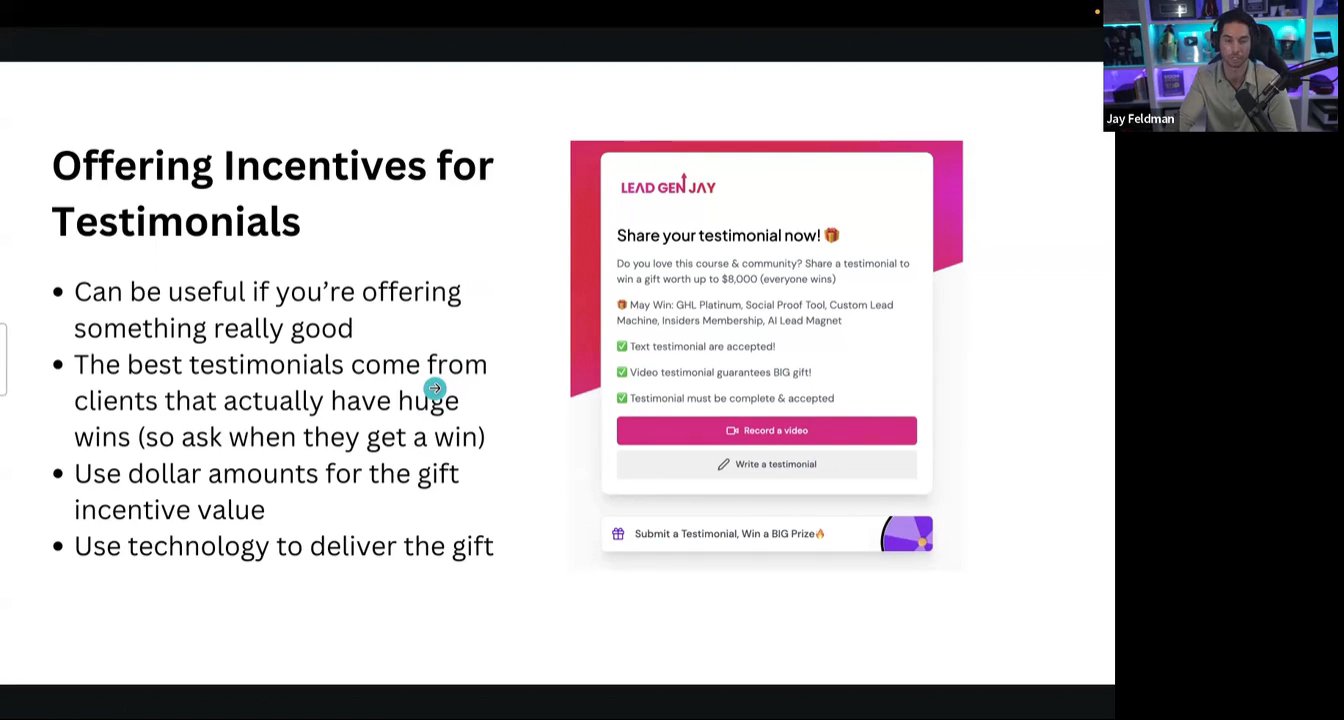
Video transcript: You need testimonials for most offers, especially offers that are based on experiences that people are having and trust. So my course, I don't think I'd sell a single course if it wasn't for testimonials. That's why when I started it, I released it really cheap. The people that I knew and liked and I asked for testimonials from a lot of them. And that first batch of testimonials helped me sell many more memberships to the course. And we do the same thing for the PR program and our lead gen offer testimonials are huge. So I'm going to be walking you through my entire testimonial process. How I use them, how I collect them, the tools that I use so that you can implement this in your business. Let's share. All right. How to leverage testimonials to close more deals. Collect and display testimonials effectively and automatically. If you're not already using testimonials on your site or you're doing it manually trying to embed videos and like writing five stars and like typing in the reviews, you're doing it wrong. You're leaving a lot of money on the table. I've spent a lot of time trying to figure out the best way to automate and display, and I've got a really great system that I think you guys are going to find valuable. Hopefully. I see a couple of your faces on here. So an offer with a good testimonial will convert an 89% better than one without testimonials. Did a bunch of research. 89% is wild. So if you're not using them or if you're not using them effectively, most of the people that are on your site that would have converted are not because they're not seeing the positive transformations and use cases that other people have had. Who wants to help me moderate this thing? I'll do it as soon as I get to the office. I'm two seconds away. I helped you last week. Cool. Let's see if I can do it too. If you want to give me. Yeah, co host. All right. Denny, Co host. Just mute anyone who's loud. Yep. Cool. All right. So a lot of people get confused with testimonials versus reviews. Which one should you prioritize? Which one should you display and where? Which one's more important? So I really. I went through a whole bunch of different images and explanations to try and find the one that's most clear. Testimonials are ones that you manage. You collect you own, you display. They're typically hosted on your site. They're promotional materials that you're, you're likely going to be able to use and manipulate in your own way. So for example, someone leaves me a video testimonial, I can put that in a retargeting ad, I can put that in an email sequence, I can put that all over my landing page. Whereas reviews on review sites aren't as easy to manipulate testimonials, you can also guide the person who's leaving the testimonial into what to say. There's less restrictions. You can display your most positive ones first. And people love to see transformations that other people have gone through within your program or within your offer, which is not typically the format of a review. Review is usually done on third party sites and also super important. That's rank checking. That's what we did two weeks ago. People look to these review sites for validation because it's another site saying that you're legit because they verified those reviews. They're looking at the competition that are all that have also been reviewed on there. So how do you stack up against others? That's, that's reviews. Reviews. You have much less control over what is said. There can be negative reviews, whereas there's not usually negative testimonials to display. Get them, get them, guy. All right, got them. Okay. Reviews can be anonymous. Company has no control over which ones will appear on the site. So for example, if someone looks up your reviews, there could be negative ones. You want to avoid that because that can make you lose the sale. But there's a lot of value to positive reviews too. It is that validation. When people are searching, you know, lead gen J reviews, I want them to find good stuff. Now if you're trying to choose which one to go after first, Jeff got them. Okay. If you're trying to figure out which one to do first, I always say testimonials first. It's a race to your first case study. So if you don't already have case studies, you don't already have people on your site that have gone through your program and had successful. Find those people as soon as you possibly can. To do that, sometimes you got to give your stuff away at a discount. You need to release betas. You can even give it to some people for free with the expectation that once they go through your program, you're going to be asking them for a testimonial. Then you can do reviews second. It's hard to ask people to do a lot of Both. But if you got great people, ask them to do both. And you should be registered on all the major review sites. Trustpilot, G2up, City, Clutch, Site Jabber. There's a ton of them and a lot of them have really strong SEO. So you're going to want to do both. But for the purpose of this module, we'll be talking about testimonials. All right, so here's kind of an outline of what we're going to be going over. How to ask for a testimonial. How to incentivize somebody to leave a testimonial. How to use the best tools to collect and display them. Got them. How and when to display them and then how to use them in retargeting ads and nurture sequences. Okay. How to ask for a testimonial Most people are shy, they don't like asking for feedback and they feel weird when asking somebody to do something for them or to make a video reviewing them online. First things first, you need to get over that. Most people, especially the ones who have had positive experience experiences with you, are happy to do that. It is their way of saying thank you and giving back. So have a good product and offer. Give somebody a good experience and they'll be happy to leave you a video testimonial. But you want to make it as easy for them as possible. And that's where a lot of people go wrong. If you create a lot of friction, somebody will not do it. So the best time to ask somebody for a testimonial is after a big win. If somebody says they just closed a client, they just built something, they're getting these great responses, message them and say, I'm so proud of you, you've come such a long way, I've loved watching your journey. Would you mind recording a video testimonial talking about this transformation and like what you've been able to get out of the program? At that point people are happy. They just shared their win. They'd be happy to do that and they're in the best state to do it. You want them when they're excited. I also ask it in my post purchase sequence. So about two weeks after they sign up for the program, start including it in some of my follow up emails. They if they'd like to leave feedback and I'll show you how I do that in just a second And I also use subsequences to do that so I don't want to badger them over and over again for a testimonial. If they're not interested in leaving one. But once I see that they're interested in leaving one because they clicked on Leave Feedback, now I hit them with a subsequence where I ask them to leave that testimony and I'll show you what that looks like. I also use incentives to try and get people who wouldn't otherwise leave a testimonial to go ahead and do that. I'll show you how I do that as well. Then here's an example of what a template would look like. But I'll show you mine in just a second. All right, showtime. Here's how I do it. Okay, so you signed up for my course. About two weeks down the road. We've got a two day wait, three day wait. All right, so about a week is when I first asked for feedback. So general email, you joined about a week ago. Are you getting a lot of value? If so, would love some of your feedback. Offering a gift between a thousand and seven thousand five hundred dollars in value if you provide the testimonial, text or video. And then we've got this leave feedback button. The leave feedback is a trigger link. This is important because you don't want to keep asking them over and over again if they're not interested in leaving feedback. But if you use trigger links now somebody clicked on it, that's a, that's a signal. They're raising their hand, they're interested in leaving feedback because maybe they had a good experience at this point. This will trigger another automation. But I don't just leave it to this one email for them to click on it because not everybody opens, reads and takes action on every email. You might be hitting them on a weird day, you might be hit them at a weird time. So further down the line I'll get, I'll keep asking, but shorter and towards the end, so little tiny blurb with the same trigger link. So more as like an afterthought at the end of an email. By the way. By the way, if you, if you haven't already done this, please do this. And all of these are trigger links. Once they click that trigger link, they go into this pipeline to actually get them to deliver on the testimonial. So this is a series of texts and emails basically thanking them for losing the testimonial and giving them instructions on how to do that permanently mute people. So giving them instructions and actually leading them to my feedback form. By the way, once they click that trigger link, it goes to the feedback form which looks like this for a lot of you that have already been there. It's basically an embedded form on my website using my favorite testimonial tool that I will talk about in just a second. But this sequence will basically continue for like four or five emails over the course of a week ending with this little fun one with the Batman gif. Just I like to try a whole bunch of different things. Some funny, some incentivizing, some thanking them just being very helpful. But you in a lot of cases they're going to leave a testimonial right away. So if they leave it right away, you don't want to leave them in this drip sequence because that's bad business practice. So you're going to want an automation to take them out of it which is this goal. So once they actually leave a testimonial it will match their email because they're leaving it in my, my testimonial tool. And once they do, zapier triggers an automation tags them testimonial complete. They're taken out of this automation delivering the testimonial gift. I'll talk about just a second but I automated that entire thing as well. Any questions about that setup process, how I ask for it, how I use subsequences. Cool. We can do questions at the end as well. Okay. Incentives for testimonials. So they can be useful if you're, if you have a really good incentive. But the best testimonials will come from clients that actually have huge wins and you're asking them at the point of their big success. So. Well, yes, you, you definitely can use them. I do. I think we generate a lot more testimonials because they have that incentive at the end of it. And if you see this screenshot here, submit a testimonial, win a big prize. And here's some of the things that they might win. Subscription to go high level social proof tool. Custom lead machine. An additional insiders membership. So really high value lead magnets, high value gifts and you can essentially choose which percentage of them you want people to win. When they spin this wheel that's a little, little cheat code. And they think that, you know, they could win an insider's membership that's worth now $994 if they, if they record a testimonial they can give to somebody. That's a huge incentive to leave the testimonial. And I'll show you how to set. I like to use dollar amounts for the gift incentive value as you saw in the previous slide, 75 in value and that's kind of the price range of what these things are. You know, 7,500 being the custom lead machine for me to actually come and build it for you. The 1000 being like a lifetime subscription to the social proof tool. But people think they could get a gift worth thousands of dollars, they're going to be likely to do something. And I use that same strategy to incentivize reviews and that rank jacking funnel that we talked about last time. But obviously these are my lead magnets. Those are Otter PR's lead magnets. And then we use technology to deliver the gift. And I'll show you how that's set up. All right, so the testimonial tool that I use, Senja IO, I actually afraid because I didn't have an affiliate link for it. So this morning when I was kind of finalizing the presentation, I had like, I need an affiliate link quick. I'm about to talk about the tool in my coaching session, so send you that IO if you're not already using it or you don't have a testimonial tool. It's my favorite one for a few different reasons. You can create multiple different types of forms to collect text and video testimonials. It makes it really seamless and easy for the client to record the testimonial and then unbelievably easy for you to display the testimonials in multiple different formats and then turn them into images, turn them into videos. I've never seen something work so well, and it's got that spinning wheel built into it. So if you want to incentivize people, they basically built the incentivization structure into. The tool connects really easily with Zapier. You can display it anywhere and it can grab your reviews from the different review sites and turn them into testimonials for your site. Little QR code. If anyone wants it, let me actually drop the link in the chat for everybody. I literally just put these in here. All right, so if anybody wants it, everyone. Looks like you're a Notes power user, bro. A Notes power user? Yeah. Oh, I am. Yeah. That's my main go to note taking tool. Does anybody use anything else my buddy's really big on using? What is that, Jerry? One note, one note, buddy. I know you told me. No, but that's the. That's a Microsoft tool. There's no way I use that. Come over to the dark side. I'm already kind of fully integrated into Google. Well, Google Keep, right? Google Keep is kind of the ultimate. I Use an iPhone. I'm on a MacBook. What does it do that the Notes doesn't Google keep? It's just more functional and then it's all integrated with Google. Gotcha. I know. I love my Notes. Yeah. Syncs across all platforms and Android and iOS and all that stuff. I'm, I'm, I've migrated back to it again now. I love Notes, but I'm using Samsung Notes too, because I've been doing handwritten notes. Certainly use handwritten notes on, for meetings and on tablets. So that. Which does sync the OneNote. Yeah, it does sync. You can do handwritten notes on here too, I guess. It's. It's whatever your. Whatever technology hands off the best between your different devices. This one works well for me. All right, so that's Senja. Cool. So here's how I configure Senja. Here we go. I'm already logged in here. Here's what it looks like on the back end. You're basically going to create forms, and within these forms, you can determine what you want to ask people to do. The big things that I want to suggest that everybody does within these forms is to really guide your client on what you want them to say in the testimonial. So a lot of people have never done a testimonial before. They're not comfortable on camera. So you want them to hit on a few important points, and that's the response page. So if, if they're recording a video, you want them to hit on a few of these points. What's the name of your business? How did this course help you explain your transformation before and after? How did this course get you from A to Z? Why should others take this course? So just like, lead them through what you want them to say in that testimonial. When people are consuming these video testimonials, they're looking for a transformation. What. Where did that person start and where did they finish? So if you can get the, your testimonial reviewer to talk about that transformation, and it's going to be much more impactful for closing that sale. And this is how we set up the prize widget. Select 2 times more testimonials by enabling rewards. You can set what you want it to look like. And basically, once they're done reviewing that testimonial, they get to spin the wheel for a prize. And each one, wherever it lands, you can determine, for example, how they're going to claim it. So head to this site, claim prize, and put in a code which triggers that automation to actually get them the gift, which is done by my, my VA team. So really simple kind of use case there. So you're going to set up that form. You can embed the form anywhere or you can send people directly to the form. I embed it on my site so that I can retarget them in all kinds of ways. But what's really cool here is when testimonials come in, oh, I got a one, my first one star. Screw this guy. Never had a one star before. So they come in like this, unapproved, typically as a video with a transcript. So I typically go through, take that transcript transcript and turn it into one that looks like this. That wasn't a video testimonial. So I'll grab the transcript, I'll find like the best sentence or excerpt from that review and I will copy it into the excerpt and I'll highlight the most important line. This becomes important when you're displaying it because it'll pull these excerpts, it'll pull the, the single most valuable line and it'll use them as a display. You can also tag them so that you can display certain tagged testimonials on different pages or for different use cases. So, for example, my featured ones are my top testimonials that I want to lead with. So I'll tag those all as featured. And then in the studio where I'm actually determining how I want to display them, there's a lot of different ways to display them. You can arrange what, how you want them to display. There's a lot of different formats that you can do. So these are widgets that you can use on your site. If you've worked with some really cool companies before, you want to display the logos that you're partnered with, you can do that. You can do small kind of testimonial displays like this, like under buttons and on checkout pages. So it's not to like overwhelm your visitors, but I'll show you the ones that I actually use and most of my pages. So I like this one a lot goes under my buttons. It's really discreet. It shows kind of the number of reviews and you can like hover over people to see it. It'll take them to my wall of love. So if they want to see all the testimonials, it'll do that. I lead with kind of my featured testimonials. So the most impactful videos. I don't want to overwhelm people. So this is kind of just like my top 20 or 15 chosen ones. And then if you keep scrolling towards the bottom, you get the wall, which is just like a. A ton of them with like screenshots and all the different formats. And then on my checkout page, I've been much more discreet. I have tried to use testimonials all over my checkout page, and it actually doesn't help that much. So being discreet with it, use it on the sales page, not overwhelming people on the checkout page. Okay, so here's my advice for displaying them to increase your conversions. Also, your sales pages should have tons of testimonials on them. I kind of showed you what I like to do. Put them somewhere in the middle where all. They don't have to scroll too far to see them, because this is going to be one of the most important components of your sales page is what experiences and transformations have other people had. So I would say maybe a third of the way down is where you start that. But don't overwhelm them. If you put your. If you have a hundred of them, you don't want to lead with that. They're never going to make it through it. I actually did that when I first started using Senja. I didn't choose which ones I wanted to display, and I had like 50 testimonials you had to like scroll through, and it took like seconds to get through them, and that was not good. Use them on your checkout pages. I like to use the really discreet modules, the ones where it shows number of reviews, a couple faces, and then there's. There's really small, elegant ways to display them on the. On the checkout page. But don't get crazy on the checkout page. I like to use them under action buttons, too. So kind of how I just showed you, it just adds a little bit of social proof and trust that other people have done this and they've had success. So it makes others more likely to click. You can arrange them on Sendra, so lead with your strongest ones. People are probably not going to watch all of your testimony, but they might watch the top three, and they're probably going to watch the ones that feel similar to them. So if they see one that's a similar industry, a similar age group, a similar racial demographic or gender, that's probably the one they're going to click on and watch. So make sure you've got some diversity in industry and diversity in ethnicity and race and gender as well. Don't overwhelm them, especially on your checkout page. Use them in your retargeting ads and email sequences. These are going to be your most powerful emails. To close to close deals to get people to actually pay is the transformations that other people have had as said by them. So I use these in my advertising to get people to, in my retarget targeting ads to get people to sign up and in all of my emails to get people to sign up. So once you express interest in joining the program or in working with our lead gen agency, most of the highest converting emails are the transformation stories that other people have shared in these testimonials. So if you're not already doing that retargeting ads and email sequences using these transformations, your top ones are going to be huge for you. And I kind of touched on this earlier, but this is the most important thing. If you have a really tight kind of demographic, you know exactly who your buyer is. That's who you should probably display primarily in your, in your testimonials. If you have like 30% women, then make sure that you're showing ads with of testimonials with women in them because it's going to resonate much better if and same thing with ages. If most of your customers are 60 to 80, make sure that your testimonials are from people 60 to 80. Because if you got a bunch of 20 year olds doing testimonials for you, but that's not your buyer, it's not going to have this. So there's some sneaky stuff that you can do here as well. You know, is it a man or woman in your email sequence? Woman. Cool. Sell to the woman, use female case studies, use female transformations. And you can do kind of similar things with industries if you want to get really fancy. But the important thing here is to use diversity in your testimonials. If you've got women, if you've got 20 year olds and 60 year olds that are on your pages, make sure that you have testimonials to kind of COVID all of the, all of your bases. When you're writing copy for these testimonials, talk about the transformation. That's what sells. If they see someone like them that went from A to Z and is now having success because of your offer, that's what's going to encourage them to buy if they're seeing these transformations. But these people are nothing like them. It's a totally different industry. The they don't have anything in common with that person that had the transformation. They're not going to buy. It's not going to be as impactful. It'll be much better if they're seeing a transformation of somebody that looks and acts and does what they do. And people will buy because they want to get the result that somebody else had in this. I was going to show you what I already showed you, so that is 30 minutes.


Anonymous
Nov 18, 2024
Iza
Nov 18, 2024

Chenell Basilio
Founder/CEO
Nov 18, 2024
Chris Nguyen
Founder of UX Playbook
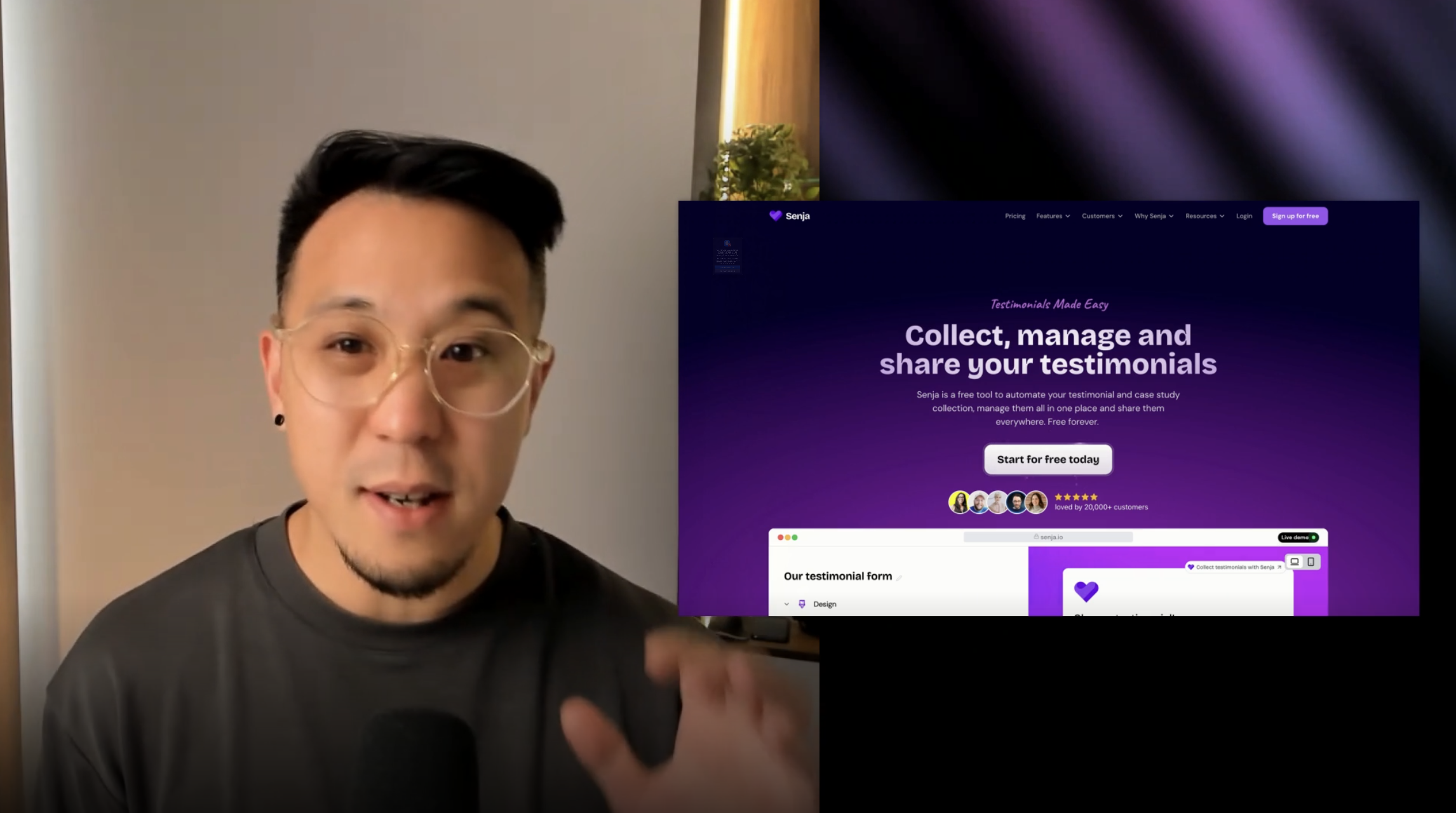
Video transcript: Today I want to show you how to make the most out of Senja. Using testimonials to build more trust and get more sales hey, it's Chris and I'm building my creator business and since May 2022 I've earned over 180,000 from my content and Social Proof has been one of my key strategies to establish credibility with my audience. I want to walk you through my three biggest revenue streams and how I use social proof in my creator business. First it's brand sponsorship, digital products and then services. Starting with brand sponsorship, it all starts with the media kit. You can see here. I'm using logos right out of the gate, then testimonies supporting my case studies, what the brand says, the results, and of course the logo. I also show how many brands I've worked with, including what they said to. I also created a wall of love called Sponsors. I've tagged brand partnerships. I've even tagged testimonials from my event attendees and newsletter readers in order to push brands to sponsor that type of content. I always prompt brands to leave feedback, but instead of having them submit through the form, I use Sendra's Chrome extension to just quickly import what they said about the campaign. This could be from LinkedIn, Slack, or even email not forgetting to add a tag. All right, moving on to digital products. It's actually hard to find anywhere on my website UX Playbook where I don't use social proof and customer testimonies. Some examples here are the avatars and stars. Then we have the avatars, the rich cards and the masonry grid. Also what I love about putting into my footer, the scrollable quotes and I've made a wall of love which I've prioritized video. I've created categories and tags that are outcome orientated like systems taught helped get a job and portfolios improved. And this is how I think about tagging. They can either be product based or problem and solution based, even business type. Here you have my coaching business and my sponsorship and then even different channels or lead source for digital products. I also leverage my onboarding sequences where I prompt users to leave a testimonial. Clicking on Leave a testimony will get you to here where I've included a video to increase the response rates and offer a free gift if they choose to leave a testimonial. And finally, let's talk about my coaching service and how I use testimonies there. I've built a specific form for my membership and coaching service here. When a user submits a testimony, they'll get automatically tagged to backlog. What that means is the testimonies from Backlog will only display here, and it wouldn't mix and match with my other product. I'm also leaning heavy on video testimonials, and if we filter out Backlog only testimonials, you'll see that I've added a lot of screenshots too, just to give a little bit more color. And lastly, I also use Senja to embed videos to replace YouTube or Vimeo. I just find the UI a lot cleaner, from exporting testimonial images and dedicated wall of loves to organizing testimonials based on problem solved or even using Sendja as a video player. That's how I use Senja for my creator business. Tell me how you leverage social proof
HubSpot Excellence


Ruby
Your UX Research partner in Southeast Asia | founder @ rex | Featured on CNA | Keynote speaker

Oct 17, 2024


Assistantly-Virtual Assistants



Sep 19, 2024


Jay Clouse
Founder, Creator Science
Aug 23, 2024

Rated 5 out of 5
Melissa Guller
Founder, Wit & Wire
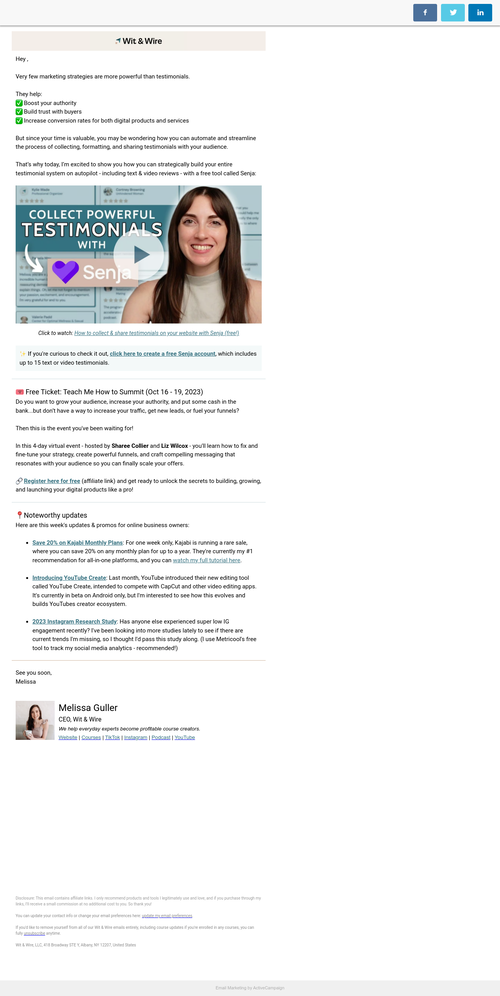
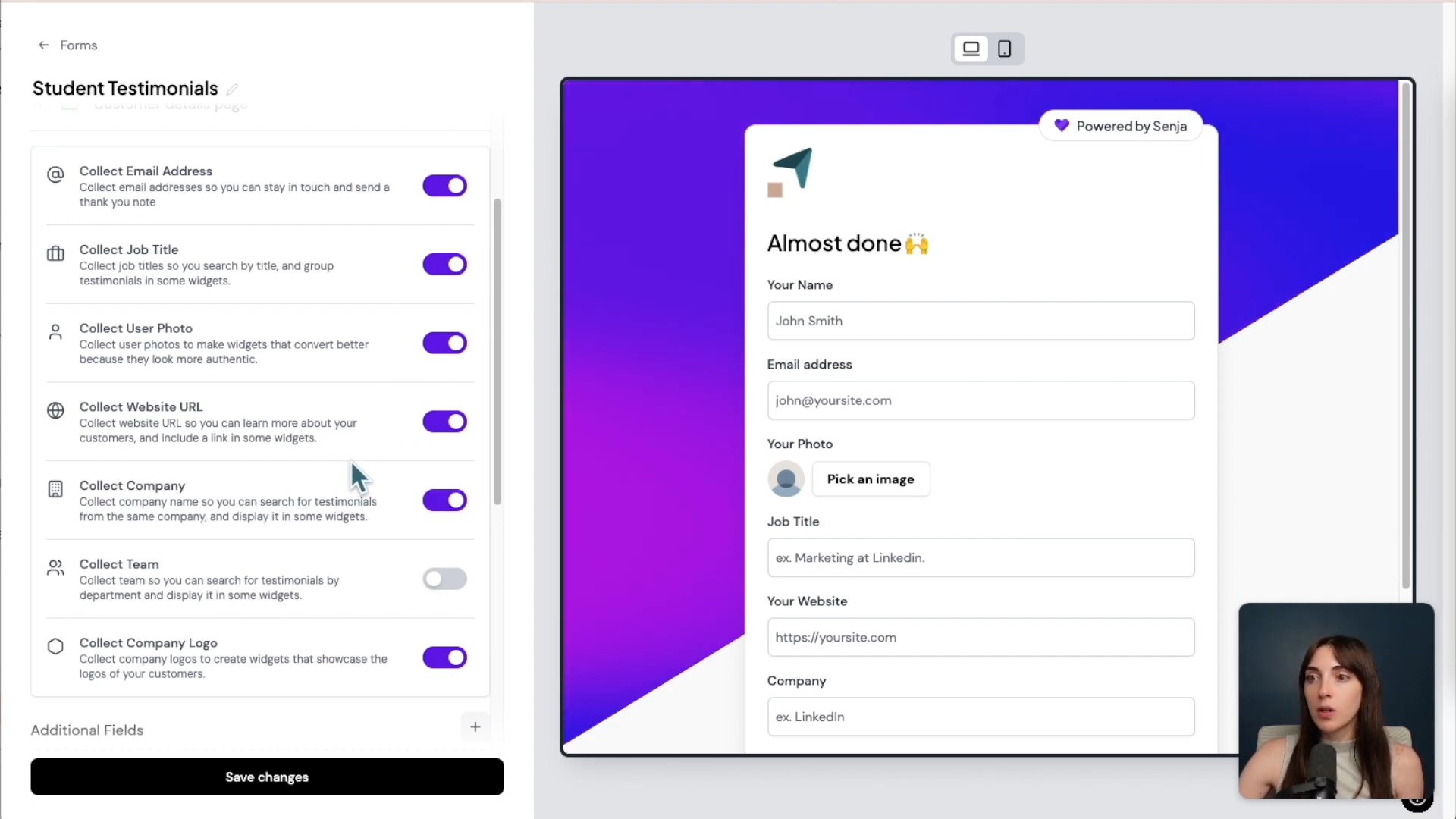
Video transcript: Very few marketing strategies are more powerful than testimonials. They boost your authority, build trust with your audience, and can help increase conversion for both digital products and services. But since your time is so valuable, you may be wondering how you can automate and streamline the process of collecting, formatting and sharing testimonials with your audience. That's why today I'm excited to show you how you can strategically build your entire testimonial system on autopilot using a tool called Senja. Let's take a look hey, I'm Melissa and welcome back to Wit and Wire, where we help everyday experts become profitable course creators. Over the years, I've collected hundreds of testimonials from wit and wire students, and not only do these make my day to read, but many prospects have reported that testimonials helped them make a buying decision with wit and wire. It's no surprise. Anytime I make an online purchase, I always look at the review section to help me make an informed decision. So not only is it important that we collect testimonials, but we also need to showcase them to share with our audience. That said, it used to feel like way too much work to not only collect testimonials, but then manually add them to my website. And so I started researching automated solutions and that's when I came across Sandra, an all in one testimonial management platform. It's been a huge time saver and I love that I could customize everything to match my brand. Although Sanja is sponsoring this tutorial, all opinions are my own and as of the time of this recording, I am an active paid customer. So let's log in and check it out. First, let's create a free account with Sandra. You can get started for free by visiting witandwire.com Sandra and you could get started on the free plan which gives you up to 15 text and video testimonials, as well as one collection form which I'll show you in a second. Over time, you might want to upgrade to the starter plan. This is the price point, paid monthly. You can save a little bit if you pay annually, but it's great that you can get started on the free plan until you collect more and more testimonials, which is of course a great problem to have. So I'm going to click get started, create an account and then I'll see you in the dashboard. When you log in, you'll see the main navigation along the left and it's divided based on function. So first you can collect testimonials either by creating forms or importing testimonials. If you've already collected some from your own form or from an external source, then we can manage testimonials and add tags. And then in the share section you can use the studio to create embeddable widgets or downloadable images. So I'm excited to run through each three of these main areas one by one, starting with creating forms to collect testimonials. So on the top I'm going to click forms and although I already have one created, let's start from scratch by creating a new form and maybe we'll call this student testimonials. So when I create this form, you can see along the left we have a menu of customization options. So first you can click design to change the logo, color or font, and then the welcome page. You can see here on the right you can customize any of the text from the title to the intro message. And then crucially, you can decide if people can submit either a video testimonial, a text testimonial, or you can give them the option. I personally like to include both. I know videos are great for business, they're a great marketing tool, but I know not everyone wants to be on camera, so I like to keep both boxes checked. It's up to you. You could then continue moving down to customize the response page. This is what people see when they are recording a video, when they're submitting a response. So you might want to include some prompts here. You can also customize what details you collect about your customers and I would keep this to the minimum, only keep these toggled on if you definitely need that info. So for example, I don't really need people's company logo, so I would probably toggle that off. The fewer fields you have, the more likely people are to submit any form. That's a general rule of thumb with conversion. So like I said, I would keep this to only the essentials and if needed you can also add additional custom fields. Then you can customize the thank you page and optionally decide if you want to reward people for submitting testimonials. You could enable rewards and let people spin a wheel potentially to get a coupon. Totally up to you. I'm going to turn this back off and then you could go through the rest of these to either customize the labels, remove branding and so on. Let's say I like these changes, I can go ahead and click save and this brings me to the share page. From here you can see three ways to share your collection form. You can share a direct link to the form, you can invite people via email, or you can embed the form. So you could either embed this on a web page, on your site, or within an online course. So I'm going to put this on my clipboard and then bring up another window to show you how I share these in my own wit and wire programs. Here's an example where I've copied and pasted that code into a lesson in my teachable course. This works in thrive, cart, kajabi, Podia, or any other course platform that allows either HTML code or embedding. Depends on the language each platform uses. But you can see the send your form embedded here where students can pick record a video or write a testimonial and they'll be able to submit that directly via their course experience. By the way, if you're wondering which questions to ask to get the best possible testimonials from your audience, if you head back under forms, you can see that Senja has a library of questions that you can browse based on your industry and your goals. Up next, let's import testimonials. So along the menu we're going to click import testimonials and you can either import CSV files or you can import from external sources like Twitter, LinkedIn, Google, et cetera. So this is a huge advantage for those of you who already have testimonials in your business because this will bring those into Senja and allow you to display them on your website or otherwise utilize those existing testimonials to market your business. Once you start to collect testimonials, it's time to manage and tag your reviews. Right now I'm looking at the testimonials tab and this is the full database of all testimonials you've collected. At the top, you can search through your testimonials either for a key phrase or you can look at these filters to find testimonials that are either approved or unapproved. You can search by source, you can search by tag, and there is an advanced search if needed. Now if you need to edit a testimonial, you can click on it and then click the pencil icon on the top and I'll show you. One thing that I usually do is I will scroll down here and in the written testimonial I will often pick a key sentence like this and then I will highlight it. And this is a great way to emphasize to your prospects what the most important and punchy piece of this testimonial is. So you'll notice right now it's yellow. That's not how it will appear later in the customization section coming up, I'll show you how you can change the color. So for now, we'll keep it as is and click save. Also here you can see the option to add a tag. And the way I use tags is to separate which testimonials go to which products or services. Or I'll use a tag for different locations if I want to have widgets in different places on my website. So maybe just as an example, let's add a tag for course builders, which is one of our wit and wire programs. And now, because it's tagged, I could have this testimonial show up on the course builders sales page and I'll show you how to do that shortly. I'm going to head back over here and then just let you know. You can also do more advanced searching here on the side, and you can also take a look at all of your tags on the left. Up next, let's create a shareable widget. I'm going to click studio on the left, and there are tons of options here, but this is how you can start sharing your testimonials with your audience. So what I'm going to do first is create a widget that's going to be a copy paste code snippet that displays either a single testimonial or a group of testimonials. Now, you could start from scratch, but I'm going to actually click this recently created widget. And here you can see this is called course builders because I want to include all the testimonials from this program so I can show it on my sales page. So let me show you a quick preview of where this lives. Here is the sales page on our Showit website for course builders. And I've scrolled halfway down. Here are all of the latest testimonials. And when new students submit more testimonials, they would appear here at the top. So let's head back over to Sendja and take a look at how this is built. First, we selected testimonials, and what I did is I filtered which testimonials should appear based on if they have the tag for course builders. I'm going to go ahead and save that filter, but you could choose one or more tags or other criteria on the side. Then you can see I've already started with the testimonial masonry widget as my base and then under design you can really customize the options, you can customize the colors, you can customize the layout. For example, I wanted them to have extra large spacing and only two columns, but you could adjust it to be three columns. You can then decide if you want a border or a shadow. You can change the typography. You can also add filters. And to be clear about the difference, I'll just do this as an example. Let's say I added a filter and I called it course builders. This won't quite make sense here, but what this does is it gives you more of a menu along the top. So if your viewers click on one of these, it would filter the testimonials to only show the testimonials that met that criteria. So I'm going to get rid of these. But again, to reiterate, the filters section here puts little navigation buttons at the top, while select testimonials decides which should appear at all in this widget. You also have a few other advanced options, but once you're happy with how this looks, you can save your changes and I'm going to click share here you can see the copy paste snippet and they tell you which platforms are compatible. But if you know that your website platform allows you to copy paste in HTML code or to embed code, then you should be set. So shopify, WordPress, squarespace, wix, showit. All of these sites work beautifully with Sandra. So I'm going to go ahead and copy and paste this, and then if I were moving on to build a page, I would open up that page, let's say, in my WordPress or squarespace site, and I would paste the snippet exactly where I wanted it to appear. In the future, if I wanted to change the colors or fonts, I would come back into Sendja to make those updates and they would appear automatically on my website. You may also be interested in a wall of love. This is a term in the testimonial world for a page that just shows typically all of your testimonials. So unlike a widget, which you embed into an existing page, a wall of love creates a standalone landing page for those testimonials. So let's say I wanted to scroll down a bit. Maybe I will click start from scratch, but you can also see some of their starter templates here. So I will start from scratch, call this demo wall of love and click create again. I can see those starters here. Maybe I will just go ahead and click the first one. And if you wanted you can click select testimonials to filter which should appear, but I'm just going to keep the default which is all testimonials and head over to design so you can change the branding. For example, maybe you change the primary color to another tone, something that's within your brand colors and the font. And then you can change the hero copy. You can see the title and the subtitle right here. And what I really like about Zenja is the fact that when you make updates here, you can preview them immediately on the right, which I find very user friendly. So I would go through all of these settings which are very similar to the widget settings and then when you're ready you can click save changes and then share. Before we had an embeddable code, but with a wall of love now we have a link. So if I paste this in a new tab, we'll see what it looks like. Here is our standalone web page. You can change the call to action at the top. You can make other customizations below, but if you're looking for that standalone landing page, then a wall of love could be a great choice for you. You can also create shareable images. So let's say you wanted to share a particularly good testimonial on social media. What I could do is scroll down and I will click start from scratch. But along the left you can see all of these different starting templates and you can customize them. So maybe I'll choose this template and maybe I will pick Pamela's testimonial and click save selection. And here under design you have the option to change the style and then you can change the background. You can choose a color image gradient. So maybe I will go with this gradient here and you'll notice that the highlights that we chose earlier, but you can customize pretty much everything about this, including whether or not you show the avatar. You can change the logo and you can really customize this to suit your brand. Speaking of highlights, I brought back the widget for course builders to show you that you can change the color as promised under colors. So here you can see I chose a brand color. It's a little bit more subtle, but you could easily change this to as bold of a color as you'd like to highlight those best parts of your testimonials. I also want to spotlight some of the pro features in Sendjae. On the left you can see the brand tab where you can add your default colors, logos and fonts just to save a little bit of time. You might also be interested in rich snippets. This lets you add star ratings to your search results. So for example in Google you can see that when this search result appears you can see the star ratings down below which can add authority and potentially boost your click through rate in the search results. Let's also check out automate. So on the pro plan you can connect with Zapier to connect sendja actions with other parts of your business. So you can see they give some examples. Maybe when somebody has a calendly call with you then you wanna send them a testimonial request 5 hours later. That's just one example, but if you enjoy automating your business then maybe you could take a look at the pro plan to enable the zapier connection. Sandra also continues to iterate and improve. They have a new analyze feature where you can mine insights from your testimonials so you can see common phrases or what people love about you which can be great for marketing. And under the studio they have something at the bottom called the customer copy bot where you can use language from testimonials to inspire high converting copy. They give a few examples of creating a course launch email or a video script, just to name a few. Overall, I've loved using Sendja to collect and share testimonials at Witandwire and if you're excited to try it out, you can visit witandwire.com Sandra to create your own free account. If you enjoyed this video, I hope you'll give it a thumbs up. And don't forget to subscribe to wit and wire for more online business tips while you're here. Here's another video that I think you might enjoy.

Jay Clouse
Founder, Creator Science
May 21, 2024

Daniel Neale

Apr 24, 2024
zero2income
Rated 5 out of 5
Jay Clouse
Founder, Creator Science
Video transcript: Five tools that every creator should be using. Number one is notion. Notion is what I use to take notes, track my todo list, and really manage everything. Number two is Convertkit. Convertkit is my email marketing platform that helps me communicate with my audience and send my email newsletter. Number three is Publr. Publr is what I use to schedule all of my social media posts on Instagram, Twitter, TikTok, and LinkedIn. Number four is Senja. This is a new one. Senja is what I use to collect testimonial from my audience and core students. And number five is zapier. Zapier is like digital duct tape. It helps me connect all my tools together. I've compiled more than 60 tools that I use to power my creator business, including my audio and video gear. If you want the full list, click the link in my bio.
No Code MBA

🔥 Tom Slocum
Aug 21, 2023
Le mémo